

What Matters Most
- A QR code is a shortcut, not proof of trust. It can lead to a genuine website or a fraudulent one.
- Scammers can replace legitimate codes. A fake QR sticker may redirect you to a convincing payment or login page.
- Check before you act. Inspect the source and website address, especially before entering passwords or payment details.
Looks official. But is it safe?
Here's what to know before you scan.
Why Do We Trust QR Codes Without Knowing What's Inside Them?
Because we trust where we find them.
A QR code on a restaurant table looks like part of the menu. One on a parking meter appears to belong to the payment system.
But a QR code is simply a way to store information, often a website link. It doesn’t verify who owns the destination.
The place may be genuine. The link may not be.
Can Someone Replace a Real QR Code Without You Noticing?
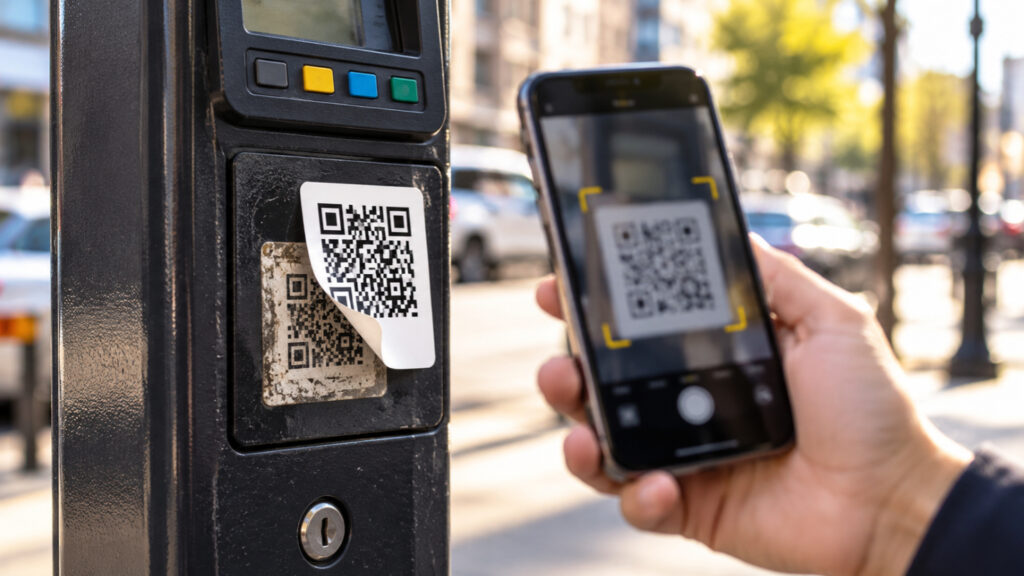
Yes. A scammer can place a fraudulent QR-code sticker over a genuine one.
In June 2025, New York City’s Department of Transportation warned about a fraudulent QR-code sticker attached to a parking meter. It directed people to an unauthorized website requesting payment information.
The parking meter was legitimate. The payment link wasn’t.
This type of QR-code phishing is sometimes called quishing.
If the Website Looks Professional, Doesn't That Mean It's Safe?
No. A convincing website can still be fraudulent.
Fake websites may imitate familiar logos, payment screens and login pages.
Check the actual website address before entering sensitive details. Look for misspellings, unusual domains or unexpected redirects.
Even an HTTPS padlock only indicates an encrypted connection. It doesn’t prove the website belongs to the organization you intended to visit.
A professional-looking page is not proof of authenticity.
What Should You Check Before Scanning a QR Code?
Three things: the location, the destination and the request.
Examine whether the code looks tampered with, preview the website address when possible, and question unexpected requests for passwords, payments, downloads or permissions.
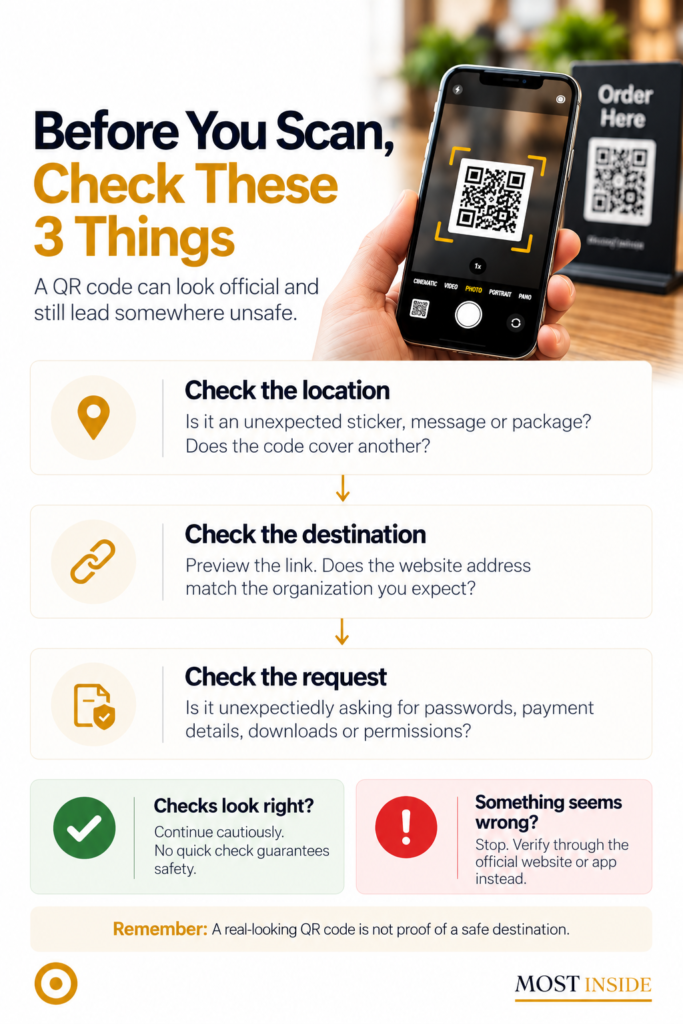
If something seems wrong, stop and use the organization’s official website or app instead.
Can a QR Code on an Unexpected Delivery Package Be Dangerous?
Yes, particularly when it encourages you to scan without explaining why.
In July 2025, the FBI warned about unsolicited packages containing QR codes that could lead to fraudulent websites or malicious downloads.Im
An unexplained parcel can make someone curious enough to scan immediately.
If you receive a package you didn’t order, avoid scanning unfamiliar codes. Verify the sender independently.
What Should You Do If You've Already Scanned a Suspicious QR Code?
It depends on what happened after scanning.
Only opened the link? Close the page. Avoid further interaction, downloads or permission requests.
- Entered a password? Change it through the official website or app, including anywhere you’ve reused it.
- Shared payment details? Contact your bank or card provider promptly and review transactions.
- Installed something suspicious? Stop using the downloaded software and seek trusted device-security guidance.
Simply scanning a code does not automatically mean your information has been stolen. What you entered, installed or authorized matters.
One Last Question
The next time you see a QR code, will you trust where it’s placed or check where it leads?
QR codes make everyday tasks easier. You don’t need to avoid them.
Just remember that convenience and trust are not the same thing.
A real-looking QR code is not proof of a safe destination.
Sources
- NYC DOT: Parking Meter Scam Advisory (opens in a new tab)June 6, 2025 warning about fraudulent QR stickers placed on parking meters to collect payment information.
- FBI: Unsolicited Packages Containing QR Codes Used to Initiate Fraud Schemes (opens in a new tab)July 31, 2025 FBI warning about unexpected packages containing QR codes linked to phishing or malicious downloads.
- FTC: See a QR Code Parked Somewhere? Don't Scan It Yet! (opens in a new tab)September 2026 consumer advice on fake QR codes, checking website addresses, and protecting accounts after suspicious scans.

Leave a Reply